
To reduce support tickets without hiring, stop treating tickets as work to be processed and start treating them as a list of things you haven't explained. Count your questions for 30 days, find the ones that repeat, write a real answer for each, and put those answers where customers already ask. The repeat questions are the removable part of your volume, and in most small businesses that's the bulk of it.
The reason this works is that support volume isn't random. In every business I've run, a small number of questions produce most of the tickets: where's my order, do you ship here, how do I cancel, does this fit my model. Each one is cheap to answer once and expensive to answer three hundred times. Hiring adds capacity to answer them faster; writing them down removes them.
The catch is that the work is unglamorous and never urgent, so it doesn't happen unless you give it a slot. And it won't help with the tickets that are genuinely one-off, which is fine, because those are the ones worth your attention anyway.
Step 1: count the questions, don't read them
Take the last 30 days. Every question, one row, tagged with a short label: order status, shipping, returns, sizing, billing, cancellation, compatibility. Then sort by count.
You're looking for the shape of the list rather than any individual message. Expect a handful of labels to dominate it, with a long tail of genuine one-offs behind them.
You'll know this worked when the top of the list annoys you. Usually it's a question you've personally answered so many times you stopped noticing it was a pattern. If nothing surprises you, your labels are too broad: "product questions" tells you nothing, "does this fit my 2019 model" tells you to build a compatibility table.
One warning about relying on keyword search here. "Do you ship to Canada", "can i order from toronto" and "international delivery?" are one question with no words in common, so keyword grouping will scatter your biggest problem across three small piles. I wrote more about reading questions in aggregate in what customer questions tell you about your business.
Step 2: write the answer once, properly
For each of your top questions, write one page that answers it completely. Completely is the part people skip.
A good answer states the actual policy or number, covers the obvious follow-up, and says what to do if the reader is the exception. "We ship internationally" generates a ticket. "We ship to 31 countries, orders under $50 pay $12, delivery is 6 to 9 business days, and here's the list" ends one.
Two rules that make the difference:
- Use the customer's words in the title. Your internal vocabulary is "fulfillment SLA", theirs is "when will my order ship". Write theirs.
- Answer the follow-up in the same page. If the answer to "can I return this" produces "how long do I have", you've replaced one ticket with another.
Write these in the order the count gave you and stop after five for now. Five real answers beat a 40-article help center that nobody could finish.
Step 3: put the answers where customers already ask
This is where most help centers fail. The content exists, it's accurate, and nobody reads it, because it lives on a page customers only find after they've already emailed you.
Answers need to sit at the point of the question. The shipping policy belongs on the product page and in the cart, not only in the help center. The cancellation instructions belong in the account settings screen and in the renewal reminder email. If people ask a question mid-checkout, that's where the answer goes.
The other half of this is a searchable surface on every page, which in practice means a widget or a search box that can answer in the moment. A help center you have to navigate to is a filing cabinet. Something that answers on the page the customer is already looking at is a deflection.
Then check your own email. If your support address auto-replies with nothing useful, add the three most common answers with links. That one edit deflects tickets that were already written.
Step 4: remove the cause, not just the question
Some tickets aren't information problems. When customers keep asking you to confirm something your site already says, the copy isn't landing, and another article won't fix it. "Is shipping really free?" is a trust problem.
So for each repeat question ask what created it. A confusing checkout step, a shipping partner that's gone quiet, an email that doesn't include a tracking link, a price that reads ambiguously. Fixing the cause removes the question permanently and usually improves conversion at the same time, which is the part that gets you budget for the rest of the work.
This is the step that pays off most and the one that needs a human, which is exactly why the previous three steps are worth automating.
Step 5: measure the right number
Total ticket count is a bad target on its own, because it moves with traffic, seasonality and launches. Two better numbers:
Repeat-question rate. What share of your volume is your top ten questions? If that's falling, your answers are working. If total volume is flat while this falls, you're growing and holding support steady, which is the actual win.
Unanswered rate. How many questions did you have no answer for at all? This is your writing backlog, ranked. It should never be zero, because a zero means you've stopped hearing about new gaps.
Give it a month per round. Fix, wait, count again. Anything faster and you're measuring noise, and you'll conclude an article failed when it just hadn't been indexed yet.
What this looks like when it's working
The numbers I can point to are our customers' rather than benchmarks. The Breather deflected over 1,200 tickets in the first 30 days, with inbound volume down nearly 40% across email and phone, and their questions were the boring repeatable kind: hours, policies, product details.
Day to day the tell isn't a graph. It's that you stop recognising the questions in your inbox. When most of what's left is unusual, you're done with round one, and the ticket queue has quietly turned into a list of things actually worth your time.
How Answer HQ does the tedious parts
Steps 1 and 3 are the ones that break down by hand, and they're what we built for.
The widget is one script tag on your site, and it answers from your own content: your website gets crawled into a private Knowledge Vault, you upload the documents that aren't on the web, and answers come back with Quick Citations linking the exact page they came from, so customers can verify rather than take an AI's word for it. That's step 3 handled on every page rather than in a help center nobody visits.
The widget also has a Help tab, which is your own help center inside the widget with categories and search, and it appears once you've published at least one article. Unlimited articles on every plan, and a hosted public help center if you want the pages public too.
For step 1, Insights on Pro and Growth does the counting: questions are grouped into Topics by meaning rather than keyword match, which is what handles the Canada/Toronto/international problem, and it works across languages including Chinese, Japanese and Korean.
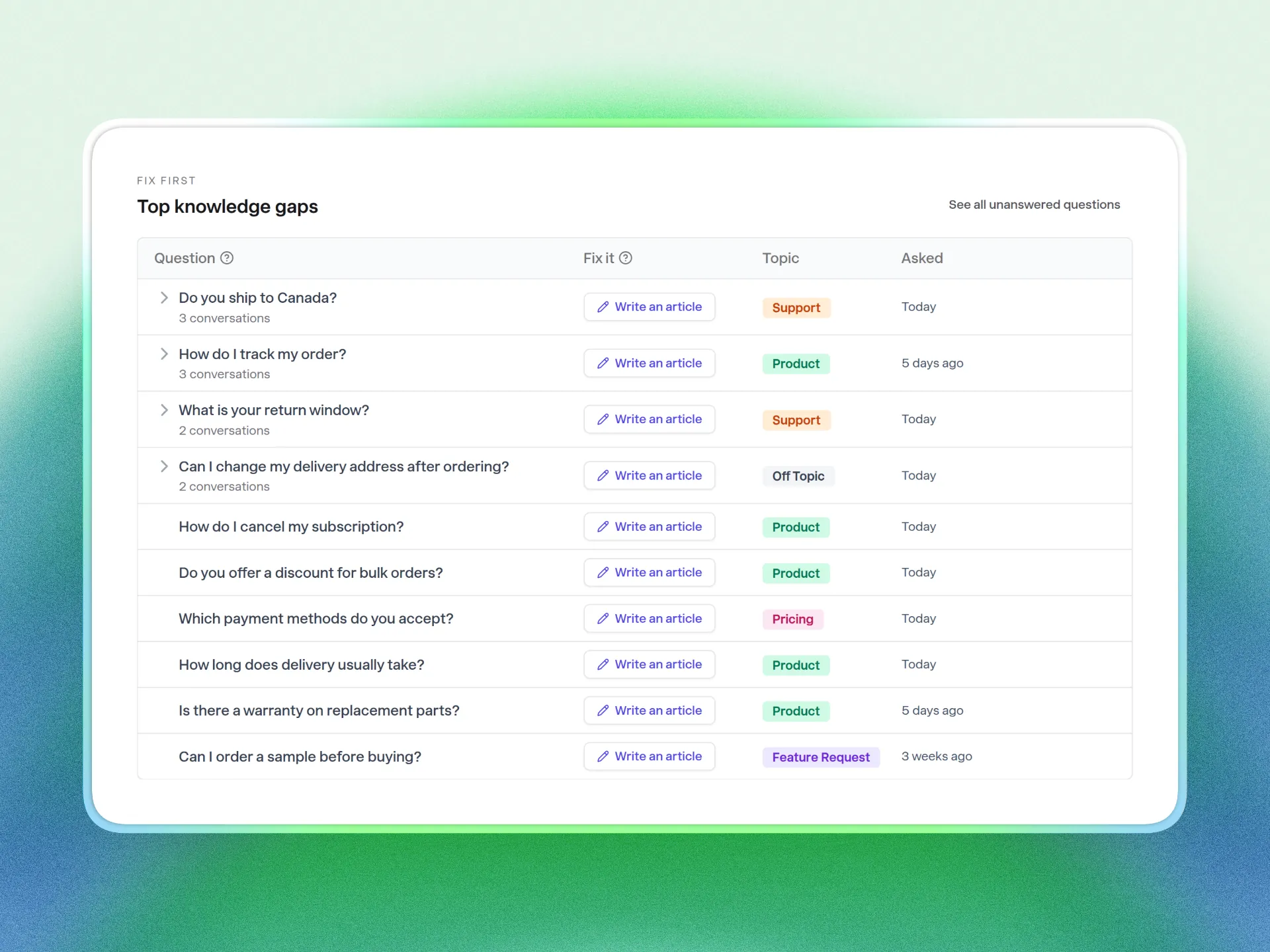
Ranked knowledge gaps give you the unanswered list, and there's a guided flow that pre-fills an article with the title, category and the real customer questions behind the topic, then marks the topic resolved when you save. Chats get analyzed on every plan even though only Pro and Growth can open the dashboard, so upgrading shows you your history immediately.
When a question does need you, handoff happens in-conversation through a contact form and lands in Tickets, which threads by email and is on every plan. Answer HQ isn't a shared inbox and there are no agent seats to buy, which is the point: pricing is flat monthly rather than per agent, so removing tickets doesn't just make your team faster, it stops your support cost from tracking your growth.
FAQ
How can I reduce support tickets quickly?
Start with the single question you answer most, write one complete answer for it, and put that answer on the page where people ask plus your support auto-reply. That's an afternoon of work, and the signal you're looking for is that particular question arriving less often. The systematic version, counting 30 days and working down the list, takes a couple of weeks and removes far more.
What is a good ticket deflection rate?
There's no honest industry number, and anyone quoting one is guessing at your business. Measure against yourself: what share of your volume was your top ten questions last month versus this month. Your own trend line is a better read than any benchmark, because it's the only number that accounts for your traffic and your products.
Will a help center actually reduce tickets?
Only if customers hit it before they hit your contact form. A help center linked in the footer barely moves volume. The same content in a widget on the product page, in the checkout flow, and in your support auto-reply does, because it's answering at the moment the question occurs.
Do I need AI to reduce support tickets?
No. Counting your questions and writing five good answers works with a spreadsheet and a text editor. AI helps with the parts that don't scale by hand: grouping questions that mean the same thing, surfacing what you couldn't answer, and answering at 2am in the customer's language.
How do I stop tickets growing as I grow?
Watch repeat-question rate rather than total volume, and keep a monthly slot for writing answers to whatever's new. New products and new markets create new categories of confusion, so the list is never finished. Thirty minutes a month is enough to keep it from compounding.
If you've got a month of questions sitting in an inbox and a chat log, that's enough to start. Start a 14-day trial, point Answer HQ at your site, and let it group the questions you've been answering by hand.